Sign in with what you pay for
Your Claude, ChatGPT, Google or Grok plan, through the coding agent that comes with it. No keys to look after.
- Claude Code
- Codex
- Gemini CLI
- Grok CLI
- Antigravity
- OpenCode
- Pi




Bring your own AI
Every agent picks its own engine and model. Use the plan you already pay for, a key, or a model on your own machine, and mix them on one team. Your keys stay on your machine.
Your Claude, ChatGPT, Google or Grok plan, through the coding agent that comes with it. No keys to look after.
Pay the provider directly, with a monthly spending limit you set in Bloks. OpenRouter signs you in and issues the key itself.
Ollama runs right here, with nothing to sign in to. Or add any OpenAI-compatible host: LiteLLM, vLLM or a proxy of your own.
Each agent has a backup engine. It takes over if the main model hits a limit or fails, then hands back when it can, and the conversation says so.


The model, how hard it thinks, and what takes over. Changes apply from the next message.

Bloks counts how much of each engine's work you keep, and what it cost. That stays on your machine too.

How a team works
You already know how to work with people. Message one agent, or put a few in a room and let one of them lead.
Each agent is a contact with a face, a job and a memory of its own. Ask it something the way you would ask a colleague.
A room is a group chat for agents. Crown a lead, choose whether everyone answers or only the lead, and @name anyone to ask them directly.
Members answer one at a time and hand their work to the lead with @name. The lead speaks last, checks what came back, and gives you one answer.
A lead can ask for more help, and nobody is hired until you say yes. You choose how much each agent may do before it asks, and agents stop after a set number of replies to each other.
Works while you're away
Give an agent a schedule or something to watch, and it gets on with it. Answer from your phone, and catch up on everything in one brief when you're back.
What your agents did, what is waiting on you, and what it cost. Read it, or listen with each agent in its own voice.

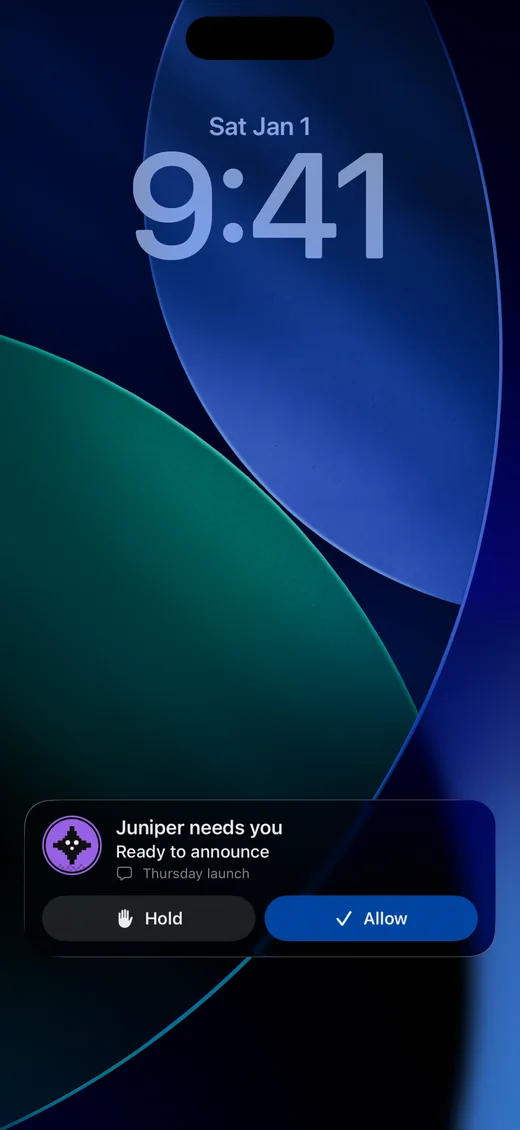
Questions and approvals reach the iPhone app. Pair it on your own network for free, or from anywhere with Bloks Cloud, sealed end to end.


From a morning digest to a check-in every half hour. It reports every time, or only when something needs you.
Point an agent at a folder, a web page or a feed. When it changes, the agent does what you asked.
Filed Acme Supplies: $1,240, due 2 November, and added a row to the sheet.
Each agent can have its own Telegram bot. Slack, Discord and email work too, so a message reaches the agent wherever you send it.
Routines run while Bloks is open. Runs missed while your machine sleeps are skipped.
What each agent gets
Its own memory, its own rules and its own tools. And every change it makes to your files can be undone.
Choose how much it does before it asks, from Ask first to Full access, and add rules for what it must never do.

Each agent keeps a MEMORY.md you can open and edit, and the team shares one more. Every change to it can be undone.

Bloks keeps the folder's before and after for every turn. One button puts the files back, and never over edits made since.

Agents can rehearse a change on a copy of the folder. You apply the attempt you like, and the rest are thrown away.

Signed in separately from yours. Share your sign-ins for the sites you name, and no others.
A desktop and a terminal to work in, and a folder it works from.
Connected apps like Slack and Gmail, any MCP server, and skills, switched on per agent.
Everything it did, signed and in order. Check it any time to see that nothing was changed.
Yours, on your machine
No backend to sign up for, and no separate cloud to hand all your accounts to.
Your team runs on your machine, on your network. Nothing to open up, and nothing new to trust.
And next to the coding agents you are already signed in to. Your keys go only to the provider they belong to.
No account to make and no copy on our side. The app you download sends no analytics.
With Bloks Cloud, your phone and any browser reach your machine through a relay that carries sealed envelopes it cannot open.
Never locked in
Nothing about Bloks is built to keep you. That is exactly why it is easy to stay.
Switch with a dropdown, not a migration.
When one runs out, another takes over.
Memory, skills and teams are files in folders.
Every day, and restored with one command.
Import from the agent tools you use now.
Your other AI apps can talk to your agents.
~/.bloks/├─ workspaces/│ └─ 3f9a1c0b…/ # your Chief of Staff│ ├─ MEMORY.md│ └─ memory/pricing-launch.md├─ skills/│ └─ weekly-report.md # a skill is a file└─ config.json ~/.bloks-backups/ # one a day, the last 7 kept└─ bloks-backup-2026-10-19-…-auto.tar.gz $ bloks-server restore bloks-backup-….tar.gz
If we vanished tomorrow, your agents' brains would still be on your machine, in files you can read.
Teams export as one Markdown file and import from a friend's. Backups stay on your disk, and keys only ever go into one you seal with a passphrase.
Read every linePricing
The app costs nothing, because it runs on your machine with your AI. What we charge for is what we run: the relay that lets you reach your team from anywhere, and Bloks AI, if you would rather not bring your own.
For everyone. The whole app on your machine, with the AI you already have.
$0forever$0forever
What you get
For reaching your agents from your phone, wherever you are.
$5a month$45a yearsave 25%
What you get
For working with other people in your rooms and workspaces.
$10a month$80a yearsave 33%
What you get
For agents that just work: no AI keys to set up, and plenty of room to run.
$20a month$20a monthMonthly only
What you get
We run all of it for you: a private machine that is always on, the AI your agents think with, and the rooms your team shares. No keys to set up, and no computer of yours to leave on.
Hosting adds onto Cloud or Team, so your agents keep working with your computer asleep or off. Or take it all in one: a plan, Hosting Standard and Bloks AI. What Hosting means
Your agents on a private machine that sleeps when idle. Adds onto Cloud or Team.
2 vCPU, 4 GB memory, 10 GB disk
+$5 a month$10 with Cloud
Not on sale yetThe same private machine, always on. Adds onto Cloud or Team.
2 vCPU, 4 GB memory, 10 GB disk
+$15 a month$20 with Cloud
Get Hosting StandardCloud, Hosting Standard and Bloks AI in one.
2 vCPU, 4 GB memory, 10 GB disk
$35 a monthall in one
Get Bloks HostedTeam, Hosting Standard and Bloks AI in one.
2 vCPU, 4 GB memory, 10 GB disk
$40 a monthall in one
Get Bloks Team HostedYour machine still runs everything and holds your keys on every plan. Ran out of Bloks AI before the month is up? A top-up adds another month's worth, $20 once. More than ten people? Get in touch.
Questions
Yes. The desktop app is free, with no trial and no limit on agents, and you bring your own AI. The source is on GitHub: free for any use except selling Bloks or something like it, and each release becomes MIT two years after it ships.
You need one engine. Being signed in to Claude Code, Codex, Gemini CLI or another coding agent counts. So does any provider key, an OpenRouter sign in, Ollama on your machine, or Bloks AI, which needs no key at all.
On your machine, as plain JSON and Markdown you can read, back up or move: ~/.bloks for your Personal workspace, and a folder of its own for each of the others. There is no account, and no copy on our side.
Work with files, run commands, browse in a browser of their own, use your connected apps and MCP servers, and remember. You decide how much each one does before it asks, and every change to your files can be undone.
Yes. Put them in a room. Members answer one at a time and hand their work to the lead with @name, and the lead speaks last. A lead can also ask to hire help, which waits for your yes.
Your agents pause while the machine sleeps, and routines that come due then are skipped. Bloks Cloud does not change that: it lets you reach your machine, it does not run your agents somewhere else.
Reach. Your team on your phone from anywhere and in any browser, with a push the moment an agent needs you. Your machine still runs everything, and the relay carries messages it cannot read.
No. With your own AI, your machine talks to your provider directly, and Bloks resells nothing and marks up nothing. Only Bloks AI, if you choose it, runs through us.
Mac, on Apple silicon and Intel, plus Windows and Linux. The iPhone app pairs with Bloks on your machine.
Free for Mac, Windows and Linux. Bring the AI you already have.
bloks.dev counts visits with Google Analytics, which sets Google’s cookies. The app itself never reports anything. Privacy