


All comparisons
BloksMeta Muse

Checked 6 November 2026 · Sources

Bloks vs Meta Muse

Muse is Meta's personal agent: it runs errands on a cloud computer of its own, and you reach it from a phone app, the web or WhatsApp. Bloks is a desktop app your agents live in, on your own computer, running the AI you choose.

See it topic by topic

The short answer

Which one is for you

Choose Bloks ifOur pick

  • You want your agents and their memory on your own computer, not on a cloud machine at Meta.
  • You want to pick the AI: Claude Code, Codex, Gemini CLI, local models through Ollama, or the plan you already pay for.
  • You want undo on what agents change, and conversations you can rewind or branch.
  • You want a team of agents in rooms, and people in your workspaces, not one assistant each.
  • You want an app whose source you can read, and that you can run on a server of your own.

Choose Meta Muse if

  • You want an assistant on your phone and in WhatsApp, with nothing to set up on a computer.
  • You want it to keep working with every device off, on a cloud computer of its own, free to start.
  • You want errands done for you: bookings, shopping and checkouts, paid with single-use cards.
  • You want an Android app today.

At a glance

Topic by topic

Bloks ahead · 5Even · 5Meta Muse ahead · 4

Topic
What it isA desktop app for Mac, Windows and Linux. Each agent is a contact; a team is a room.Meta's personal agent for errands and goals, with a cloud computer of its own. It also suggests things without being asked.
Getting startedInstall the app; it installs and signs in the engines with one button each.Sign in with a Meta account on the web, in the phone apps or in WhatsApp. You must be 18 or older.Better
ModelsClaude Code, Codex, Gemini CLI, Cursor, Devin and more, any OpenAI-compatible host, Ollama and LM Studio, on your own sign-ins and keys.BetterMuse Spark, Meta's own model. Other providers, your own keys and local models are not offered.
When your computer is offAgents pause, unless they run on a server of yours or on managed hosting.Each person's cloud computer keeps long tasks going after the app is closed.Better
SafetyAgents ask before acting unless you choose otherwise; rules in a sentence.A separate agent, Sentinel, rules on every outbound call and connector action. Email and purchases need your approval, with an audit trail.
UndoUndo any change an agent made, rewind a conversation, or branch it from any answer.BetterNot published. Its cloud computer is backed up continuously and can be restored.
MemoryMarkdown files you can read and edit: MEMORY.md and a folder of notes.Memory files you can read and edit, ask it to forget, and download.
Teams of agentsRooms with a lead who speaks last; agents message each other and hire help with your yes. People join workspaces by invite.BetterOne Muse per person, with subagents inside. Side Chats keep a topic apart and Goals track long tasks. Shared team rooms are not published.
PhoneAn iPhone and Apple Watch app, at home or anywhere with Bloks Cloud. Android is coming.iPhone and Android apps, the web, and a voice mode.Better
WhatsAppCarry a room into a WhatsApp group. Telegram, Signal, Slack, Discord and email too.Message Muse directly in WhatsApp.Better
Computer useAn agent's own browser you can watch and take over, and a computer of its own: a cloud box, a Local VM or this one.Its own cloud browser and computer, for searching, forms, checkouts and negotiating. It does not control your computer.
Privacy and trainingConversations and memory stay on your computer; Bloks has no backend that holds your data.BetterData sits in your cloud computer on Meta's servers, kept from its ad systems. Training on it is on until you switch it off.
PriceFree with your own AI. Paid plans add reach from anywhere, people and an included AI.Free with a usage limit. Power is $20 a month and Maximum $100 a month, in limited testing.
LicenceSource available (FSL): free for any use except selling Bloks; each release becomes MIT after two years.BetterClosed source, with no licence published. It cannot be self-hosted.

Your computer, or Meta's cloud

Bloks

Bloks runs on your computer. Agents, conversations and memory are plain files in a folder you can open, and each agent runs on the engine you pick: Claude Code, Codex, Gemini CLI, Devin, a local model through Ollama, and more.

When work should go on with the laptop closed, a workspace can run on a server of yours with bloks-server, or on managed hosting, a private machine of your own that stays on.
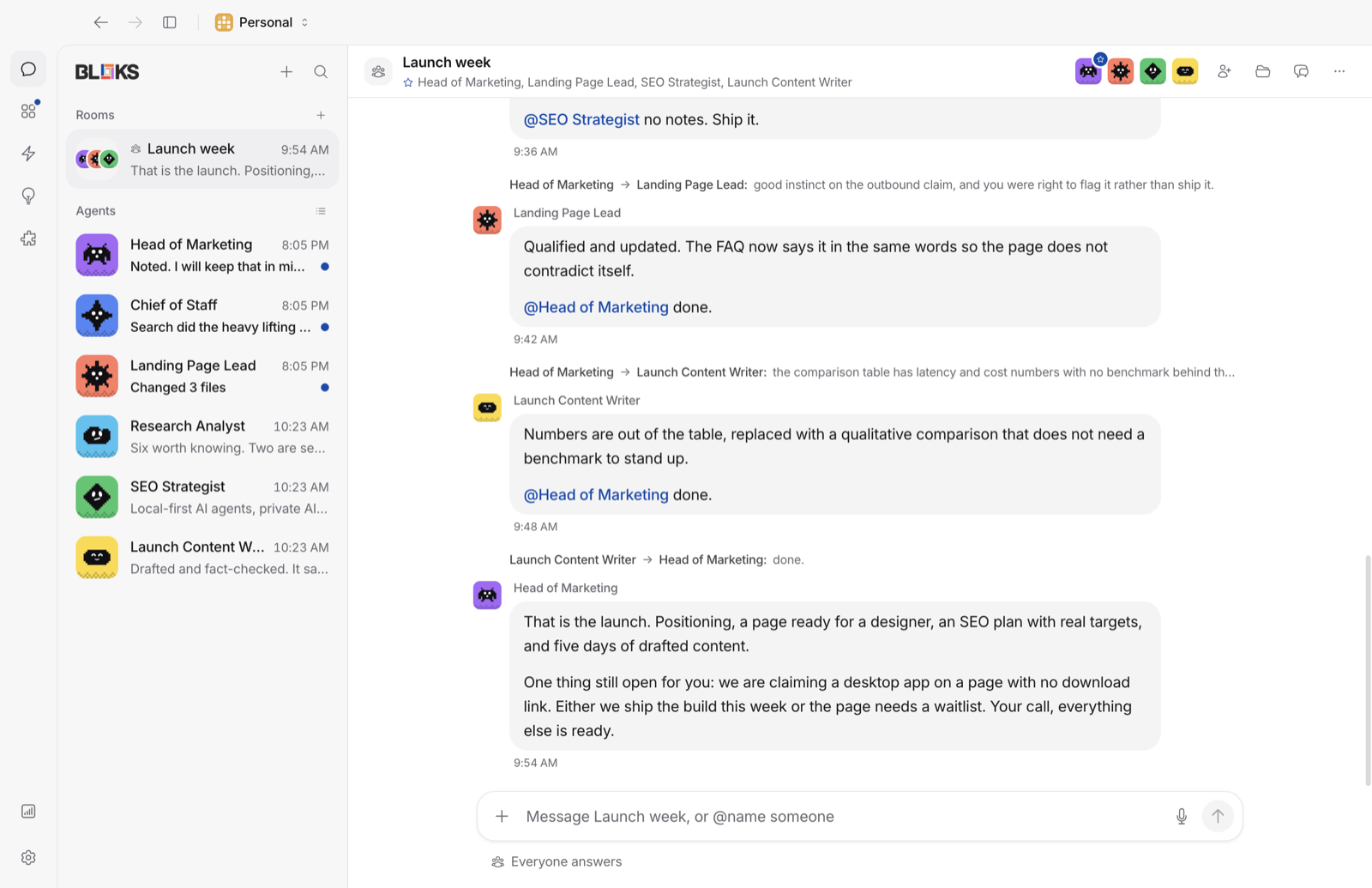
Bloks on a Mac: agents in the sidebar and a conversation open

Meta Muse

Muse gives each person a cloud Linux computer of their own, with a browser, files and a terminal, on Meta's infrastructure. Long tasks carry on after you close the app, and it can work on a schedule or react to events in the background.

It runs on Meta's own model, Muse Spark, and needs a Meta account. Meta has announced a Confidential VM, with keys only you hold, for later in 2026.

Approvals and undo

Bloks

An agent in Bloks asks before it acts, unless you tell it not to, and you can write a rule in a sentence ("never push to main"). In its browser, a password, a card number or a file upload always asks you. Every change it makes to your files can be undone, and a conversation can be rewound or branched from any answer.
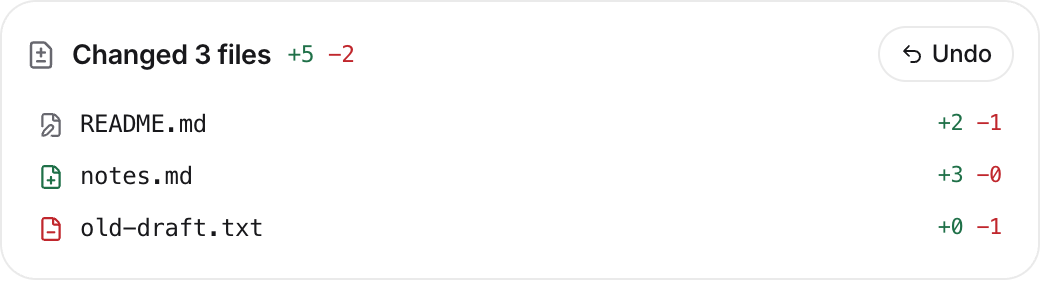
A changes card in Bloks: the files an agent changed, each one with Undo

Meta Muse

Muse's approval design is careful. A separate agent called Sentinel is the only one that can let traffic out or act through a connector, and it allows, refuses or asks you, with grants from one time to permanent. The agent itself only sees stand-in tokens; real credentials are added at the network edge. Purchases go through single-use cards from Link by Stripe.

An undo for what it did is not published, though its computer is backed up continuously and can be restored.

Privacy and training

BloksBetter

Bloks has no backend that holds your data. Conversations, memory and files stay on your computer, the app sends no analytics, and the few requests it makes on its own are listed in its README. With Bloks Cloud, traffic between your devices and your computer is sealed end to end. The engine you choose has its own terms for what it sees.

Meta Muse

Muse keeps your data in your cloud computer on Meta's servers, and says it does not share conversations or that data with Meta's ad systems. Training on your interactions is on by default; you can switch it off in Data controls, and that covers past interactions too. How long data is kept is not published.

Where Muse is ahead

Bloks

Bloks has an iPhone and Apple Watch app, and Bloks for Android is coming. It reaches WhatsApp by carrying a room into a group, not as a contact you message. Its agents pause when your computer is off, unless they run on a server of yours or on managed hosting.

Meta MuseBetter

Muse is on iPhone, Android, the web and WhatsApp, with a voice mode, and needs nothing on a computer. Its cloud computer keeps working with all your devices off, from the free tier up. For errands that end in a purchase, its single-use cards are a thoughtful touch. If that is what you want from an agent, it is a real reason to choose it.

Meet your team in a minute

Free with the AI you already use. Your agents, their memory and their work stay on your machine.

Questions

Bloks and Meta Muse: questions

Is Bloks a Meta Muse alternative?

Yes, for people who want agents on their own computer. Muse is one assistant on Meta's cloud, reached from a phone, the web or WhatsApp. Bloks is a desktop app for a team of agents that runs the AI you choose.

Can I use Claude or ChatGPT with Muse?

Muse runs on Meta's own model, Muse Spark, and other models are not offered. Bloks runs Claude Code, Codex and other engines on the sign-in you already have.

Does Muse train on my conversations?

By default, yes. Meta's privacy page says training on your interactions is on until you switch it off in Data controls, which also covers past ones. Bloks keeps your conversations on your computer and has no backend that holds them.

Does either keep working when my phone and laptop are off?

Muse does, on its cloud computer. Bloks agents do when they run on a server of yours with bloks-server, or on managed hosting.

Can I move from Muse to Bloks?

Muse lets you download its computer's files and memory. Bring your setup does not read Muse, but memory in Bloks is plain Markdown you can edit, so what you download can be added by hand.

Which is free?

Both have a free way in. Muse is free with a usage limit, with Power and Maximum plans in limited testing. Bloks is free with your own AI. Paid plans add reach from anywhere, people and an included AI.

Sources

Every claim about Meta Muse on this page was checked against its own pages on 6 November 2026. Products change: if something here is out of date, tell us at bloks.dev/support and we will fix it.

  1. Meta: introducing Muse
  2. muse.ai
  3. Muse blog: security and safety
  4. Muse blog: how Muse was designed
  5. Muse privacy
  6. Meta help: Muse subscriptions

More comparisons

Meet your team.

Free for Mac, Windows and Linux. Bring the AI you already have.

View on GitHub